Valentine link generator
A valentine link generator turns a short form into a link you can text. You type their name, your question, a message and a few date ideas. Then you pick a template and a No button style. The generator gives you an invitation link to send and a private link to read the answer.
By The Swoonlet team (Product and testing). Last updated .
How to use the valentine link generator, step by step
- First, fill in their name (up to 40 characters), your name and your question.
- Then add an optional message of up to 280 characters and up to three places and times.
- Next, pick a template, a No button mode and whether they can suggest another plan.
- Finally, tap Create my link and save both links before you close the page.
The live preview is always free, and you can send 3 free links a day with a small badge. See the pricing page for premium templates without the badge, or read how we test every invitation.
Every setting in the valentine link generator
The form is short, but each field has a job. First, their name appears at the top of the card and in the chat preview. Then your question sits in the middle, up to 120 characters. Your message goes below it, so keep it warm and short.
After that come the plans. Each place can be 60 characters and each time 48. For example, "Ramen at that tiny spot" and "Friday after class" both fit. In addition, a toggle lets them suggest another plan, which is handy when you want them to choose.
Free links vs premium links
A free link is enough for most people. You can make a few per day, with four templates and a small badge. Also, you do not need an account to make one, so you can start right now.
A premium link costs one credit. It adds four more templates, removes the badge and lets you write your own Yes and No words, up to 24 characters each. Credits come in a 3-pack for $5.99. If you send many links, Plus gives you 10 a month for $3.99, or $24 a year.
Built for more than one question
The same generator works for other moments too. For example, you can pick first date, prom, galentine, anniversary or a simple hangout. Each occasion starts with its own question and template, so you only change what you need.
Some people send lots of invites, such as event hosts or teachers planning a class party. For them, the Planner plan gives 100 links a month for $9.99. However, most people only need one good link, sent at the right time.
What the generator will not let you do
Every field blocks web links and email addresses. That rule stops anyone from using a cute invite to send people to a fake login page. So write the name of the place, not its website.
Also, the links do not last forever. Each invitation and its answer are deleted after 60 days. As a result, there is no old love note sitting online years later.
Valentine link generator limits
| Field | Limit |
|---|---|
| Their name | 40 characters |
| Question | 120 characters |
| Message | 280 characters |
| Places | 3, up to 60 characters each |
| Times | 3, up to 48 characters each |
| Custom Yes and No words | 24 characters, premium only |
| Link lifetime | 60 days |
Valentine link generator tested with a real invitation
We created this invitation with the tool on this page, opened the link on a phone screen and captured it. So the picture and the numbers below come from that run, not from a stock photo.
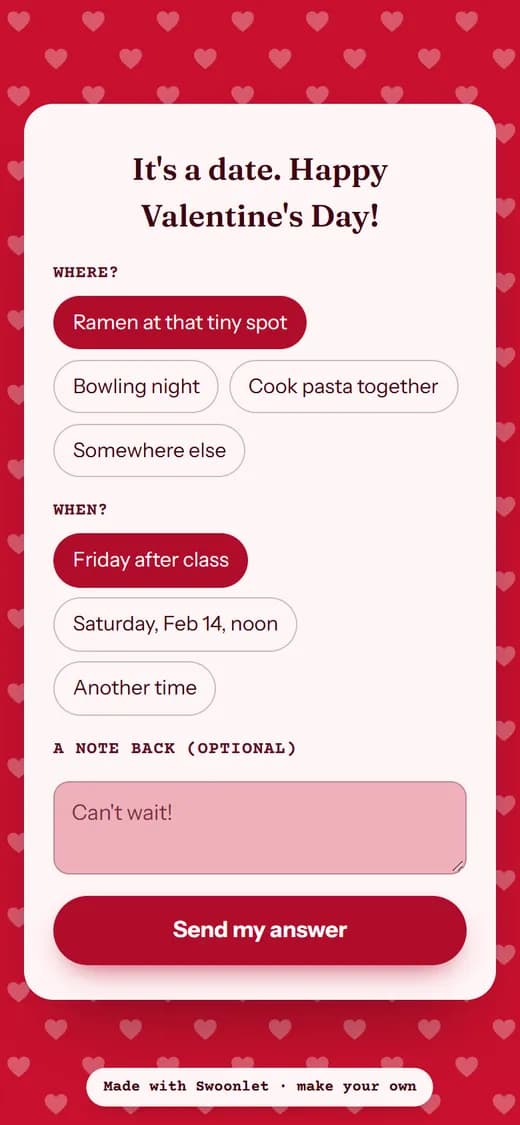
- Test input
- Valentine invitation for Sophie
- Output
- Red hearts template, after tapping Yes
- Template
- Red hearts (free)
- Places offered
- 3
- Times offered
- 2
- No button
- dodge
- Screen size
- 390 x 844
- Page weight (first visit)
- 498 KB
- Page ready in (local test)
- 33 ms
How we check invitations: a script creates one in every template, opens the link at phone size, and we tap through the answer flow by hand. More on the about page.
Valentine link generator FAQ
Is the valentine link generator free?
Yes. You can create a few free links a day with no account. Premium links cost one credit each and remove the small badge.
Does the generator send the link for me?
No. You copy the link and send it yourself, by text, WhatsApp, Instagram or any chat app. We never send messages or emails for you.
What do I get after I create a link?
You get two links. One is the invitation for them. The other is your private results page, which shows their answer and refreshes every 15 seconds.
Can I edit the link after I send it?
It is simpler to make a new one. Free links are quick to create, so fix the text, create a fresh link and send that instead.
What does the chat preview show?
Only their name. The question stays hidden in the preview, so the surprise waits until they open the page.