Will you be my Valentine link maker
A will you be my valentine link is a small web page with your question and two buttons, Yes and No. To make one, type their name, add up to three places and times, and tap Create. Then text the link. They answer on their phone, with no app, and you see the reply here.
By The Swoonlet team (Product and testing). Last updated .
How to make a will you be my valentine link, step by step
- First, pick Valentine as the occasion and type the name of your person.
- Next, add up to three places and three times, or let them suggest their own.
- Then choose how the No button behaves: it can run away, shrink or stay honest.
- Finally, tap Create my link and send it by text, WhatsApp or Instagram.
The live preview is always free, and you can send 3 free links a day with a small badge. See the pricing page for premium templates without the badge, or read how we test every invitation.
Why a will you be my valentine link works
A text that says "be my valentine?" is easy to leave on read. A link is different, because it opens a small page made only for them. So the question feels like a gift, not a chore. In addition, the Yes button is big and the No button plays hard to get, which turns a nervous moment into a small joke you share.
It also saves a second round of texts. Instead of asking and then planning, you put both into one tap. For example, add the coffee place you both like, a dinner spot and a walk in the park. They pick one, choose a time and can even write a note back.
What they see when they open the link
First, they see their name and your question on a card in the template you picked, such as Red hearts or Love letter. Then they tap Yes and a burst of small hearts fills the screen. After that, they choose a place and a time from your list, or type a better idea.
Meanwhile, the No button has a mind of its own. In the default mode it jumps away a few times. However, after six tries it holds still and lets them say no for real, because a joke should never take away a real choice.
Follow the answer without asking twice
When you create the link, you also get a private results link. Keep it, because it is the only key to the answer. It shows when they first open the invitation, whether they said yes, the place and time they picked, and their note.
The page checks for news every 15 seconds. So you can leave it open on your phone and watch the moment they reply. Finally, the invitation closes after 60 days, and then we delete it with the answer.
What a will you be my valentine link includes
| Feature | Free link |
|---|---|
| Their name and your question | yes, up to 120 characters |
| Places and times to pick from | up to 3 of each |
| They can suggest another plan | yes, you can turn it off |
| No button that runs away | yes, then it lets them say no |
| Private results page | yes, updates every 15 seconds |
| Templates | 4 free, 4 more with a credit |
| How long the link stays open | 60 days, then it is deleted |
Will you be my Valentine link tested with a real invitation
We created this invitation with the tool on this page, opened the link on a phone screen and captured it. So the picture and the numbers below come from that run, not from a stock photo.
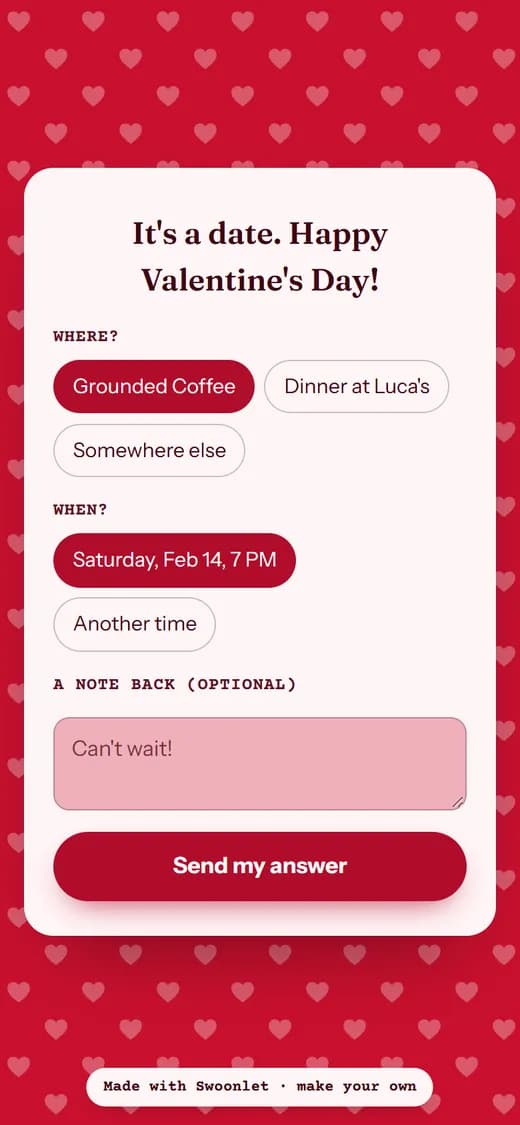
- Test input
- Valentine invitation for Ava
- Output
- Red hearts template, after tapping Yes
- Template
- Red hearts (free)
- Places offered
- 2
- Times offered
- 1
- No button
- dodge
- Screen size
- 390 x 844
- Page weight (first visit)
- 498 KB
- Page ready in (local test)
- 30 ms
How we check invitations: a script creates one in every template, opens the link at phone size, and we tap through the answer flow by hand. More on the about page.
Will you be my Valentine link FAQ
Is the will you be my valentine link free?
Yes. You can make a few links a day for free, with a small badge at the bottom. A credit removes the badge and opens four premium templates.
Do they need an app or an account to answer?
No. The link opens in any phone browser. They tap Yes or No, pick a plan and send it, all without signing up.
Can they actually say no?
Yes. The No button dodges a few times as a joke, then it holds still and works. You can also pick the honest mode, where both buttons stay put.
How do I know they answered?
Open your private results link. It shows when the invitation was opened, the answer, the place and time they chose, and their note.
Can I put a link to a restaurant in the invitation?
No. We block links and email addresses in every field, so nobody can use an invitation to send someone to a fake site. Just write the name of the place.