Make a will you be my valentine website in minutes
A will you be my valentine website is a one-page site that asks your question with a Yes and a No button. You do not need to code it. Here you fill in a short form, pick a template and get a ready page at once. Then you send the link, and their answer shows up on your private results page.
By The Swoonlet team (Product and testing). Last updated .
How to make a will you be my valentine website, step by step
- First, type their name, your name and the question you want on the page.
- Then pick a template, such as Pastel pals, Coffee for two or Starry night, and add a short message.
- Next, list up to three date ideas and three times they can choose from.
- Finally, tap Create my link, copy it and send it in your usual chat app.
The live preview is always free, and you can send 3 free links a day with a small badge. See the pricing page for premium templates without the badge, or read how we test every invitation.
A will you be my valentine website without code
Many people find these pages on social media and then try to build one. Usually that means copying a GitHub project, editing HTML and finding free hosting. It can be fun if you code. However, it often takes an evening, and one typo can break the page right before you send it.
This tool skips all of that. You fill in a few fields, so there is no file to edit and nothing to host. As a result, the page is live the moment you tap Create. In addition, it already works on small phone screens, which is where most people will open it.
What you can put on the page
First, the page shows their name and your question, up to 120 characters. Below it you can add a message of up to 280 characters. For example, remind them of the night you met or the song you both sing badly in the car.
Then come the plans. You can offer three places and three times, so a yes turns into a real date. You can also let them suggest another plan. That helps a lot when you are not sure what they would like, because they can just write it.
Free and premium templates
Four templates are free: Classic, Coffee for two, Red hearts and Pastel pals. Free pages also carry a small "Made with Swoonlet" badge at the bottom. Most people are happy with that, and you can make a few free pages each day.
If you want something special, a premium page costs one credit. It opens four more looks, such as Neon night and Love letter, and removes the badge. You can also change the Yes and No words to your own. For example, "Obviously" and "Let me think" feel more like you.
Safe for both of you
The person you ask does not need an app or an account. They just open the page in their phone browser. Also, when you paste the link in a chat, the preview shows only their name. So the question stays a surprise until they open it.
We block web links and email addresses in every field. That way nobody can use a cute page to trick someone into a fake site. Finally, the page and the answer are deleted after 60 days, so nothing stays online forever.
Coding your own page vs using this tool
| Task | With this tool |
|---|---|
| Write HTML and CSS | not needed |
| Find hosting for the page | not needed, the link is ready |
| Works on phones | yes, any phone browser |
| See their answer | yes, on a private results page |
| Date ideas they can pick | up to 3 places and 3 times |
| Templates | 4 free, 8 with a credit |
| Cost | free, or 1 credit for premium |
Will you be my Valentine website tested with a real invitation
We created this invitation with the tool on this page, opened the link on a phone screen and captured it. So the picture and the numbers below come from that run, not from a stock photo.
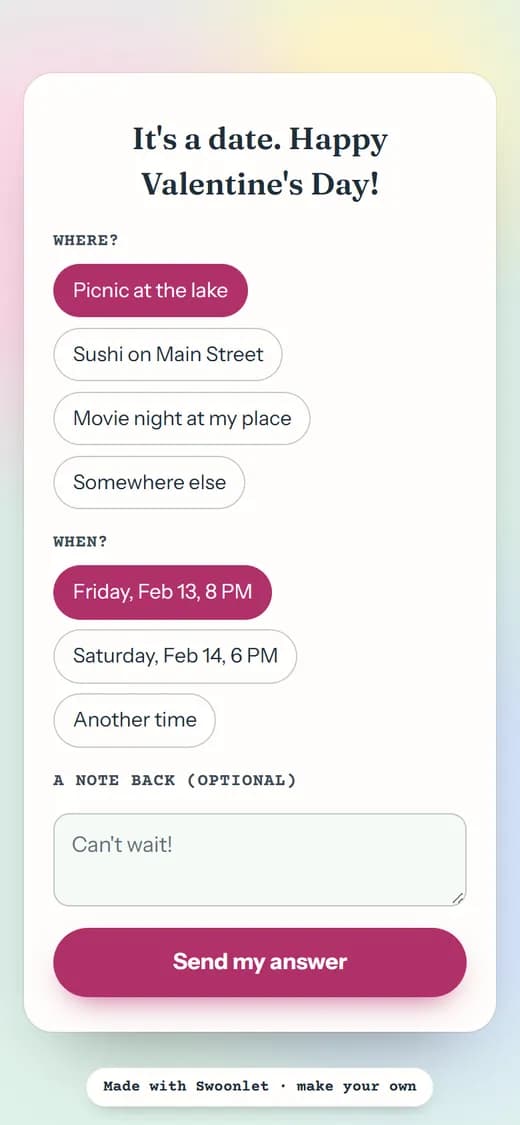
- Test input
- Valentine invitation for Noah
- Output
- Pastel pals template, after tapping Yes
- Template
- Pastel pals (free)
- Places offered
- 3
- Times offered
- 2
- No button
- dodge
- Screen size
- 390 x 844
- Page weight (first visit)
- 498 KB
- Page ready in (local test)
- 35 ms
How we check invitations: a script creates one in every template, opens the link at phone size, and we tap through the answer flow by hand. More on the about page.
Will you be my Valentine website FAQ
Is this will you be my valentine website free?
Yes. You can make a few pages a day for free, with a small badge. A premium page costs one credit, and a pack of three credits is $5.99.
Can I add photos or music to the page?
No. The page is built around your question, your message and the date ideas. That keeps it fast to open and simple to answer on any phone.
Do I need an account to make one?
No. Free pages need no account at all. You get the invitation link and a private results link right away, so keep the second one safe.
How will I know they said yes?
Open your private results link. It shows when they first opened the page, their answer, the place and time they picked and any note. It refreshes every 15 seconds.
Can I use my own domain name?
No. Every page lives on a short link from this site. You just copy that link and send it in a text, WhatsApp or Instagram message.